


Published on June 19, 2026 | Updated on June 19, 2026 | 9 min read
Application Mapping Tool: How to Choose the Right One
A factual buyer's guide to application mapping tools — what they do, what to evaluate, and where Archilu's capability and dependency mapping fits.
Looking for an enterprise architecture software platform? Use our EA tool evaluation guide and run the EA maturity assessment.
Key takeaways
- How to compare platforms on decision outcomes, not feature volume.
- How to reduce adoption risk with a short but rigorous pilot.
- How to link tool selection to governance and transformation cadence.
Table of contents
- Operating model deep dive
- What an application mapping tool actually does
- The mapping depth that separates a real tool from a diagram
- Buying criteria beyond the feature list
- Where Archilu fits
- Be honest about when a heavier suite fits
- Decide from your maturity, then buy
- Metrics that matter
- Common mistakes
- Practical checklist
Operating model deep dive
Enterprise architecture software only creates value when it improves how decisions are made across strategy, portfolio, and delivery.
Before selecting a platform, define who makes which architecture decisions, what evidence is required, and how exceptions are tracked to closure.
- Map decision workflows by role (EA, domain leads, product, security, finance)
- Define minimal evidence pack for each decision type
- Set escalation path when standards and delivery pressure conflict
What an application mapping tool actually does
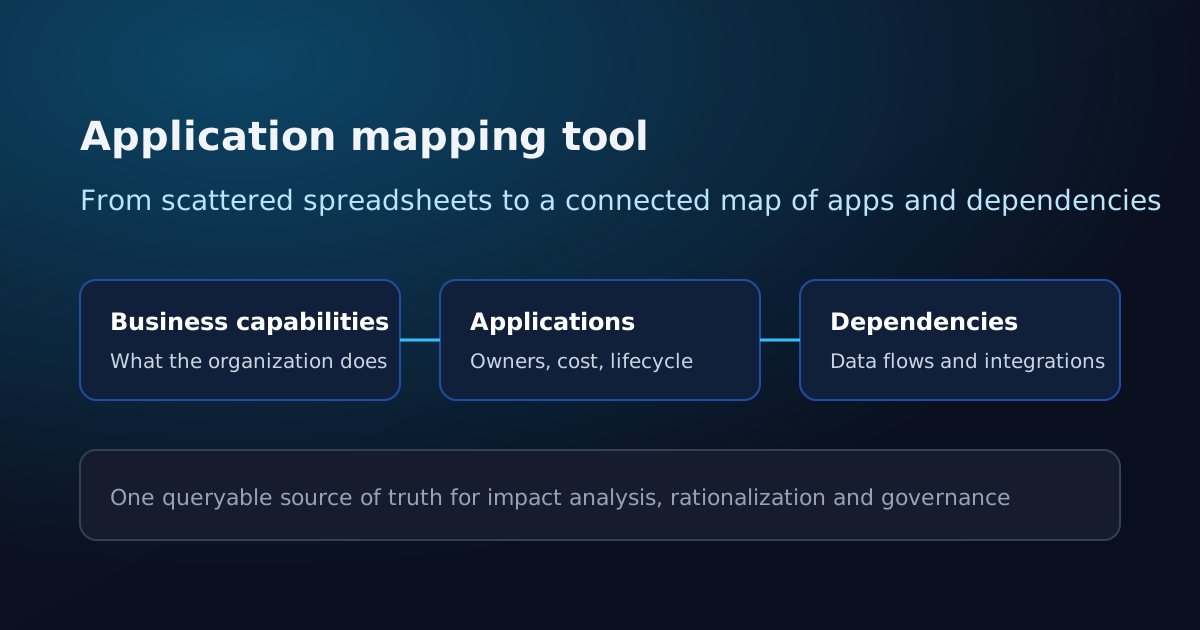
An application mapping tool answers a question most organizations struggle to answer cleanly: what applications do we run, what do they support, and how are they connected? It turns a sprawl of spreadsheets, wikis and slide decks into a connected model you can query.
The value is not the inventory alone. It is the relationships: each application linked to the business capabilities it serves, to the data it handles, and to the other systems it depends on. With those links in place, a change request stops being guesswork and becomes a visible impact analysis.
The mapping depth that separates a real tool from a diagram
Many teams call a static diagram a map. It looks right until something changes and the picture goes stale. A real application mapping tool keeps the relationships live and lets you navigate them.
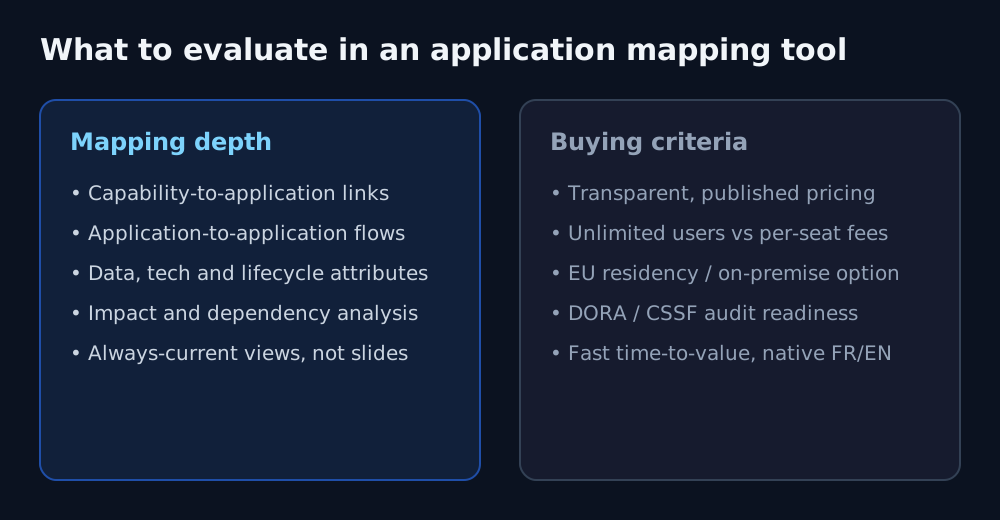
- Capability-to-application links: which systems deliver each business capability
- Application-to-application dependencies: data flows and integrations between systems
- Lifecycle, ownership and technology attributes per application
- Impact and dependency analysis: what breaks if this app changes or retires
- Always-current views generated from the model, not redrawn by hand
Buying criteria beyond the feature list
Two tools can map the same things and still differ sharply on total cost and risk. The criteria below often decide the project more than any single feature.
Per-seat licensing punishes the collaboration that good mapping needs; unlimited users let owners across the organization keep the map honest. Hosting and data residency, regulatory fit, native language and time-to-value then shape adoption and compliance.
- User model: unlimited users vs per-seat fees
- Hosting: EU residency or an on-premise option you control
- Regulatory fit: DORA, CSSF and audit-ready documentation
- Native language and fast time-to-value for real adoption
What an application mapping tool does, what to evaluate, and how Archilu maps capabilities, applications and dependencies with EU hosting and unlimited users.
Where Archilu fits
Archilu is built to map both layers that matter: business capabilities and the applications that deliver them, with the dependencies between systems made explicit. From that model you get impact analysis, rationalization signals and governance-ready documentation rather than a one-off picture.
On the buying criteria, Archilu is deliberately different: unlimited users with no per-seat fee, EU or on-premise hosting you control, a posture built for DORA/CSSF-regulated finance, native French alongside English, and an AI assistant plus a free maturity assessment to start faster.
- Capability and application mapping with explicit dependencies
- Unlimited users with no per-seat fee, so every owner can keep the map honest
- EU or on-premise hosting, built for DORA/CSSF documentation needs
Be honest about when a heavier suite fits
No single tool wins every context. If you run a very large, multi-domain landscape that needs deep, unified EA plus GRC in one suite, or your procurement mandates a long-standing global vendor with the widest integration marketplace, a heavier platform may suit you better — and we will not pretend otherwise.
Archilu is a focused choice that trades some breadth for EU sovereignty and fast time-to-value. The point is to match the tool to your context, not to the longest feature list.
Decide from your maturity, then buy
Before comparing feature grids, baseline where your architecture practice actually stands. Archilu's free EA Maturity Assessment scores ten dimensions and returns a prioritized action plan in about ten minutes — a concrete way to see which mapping profile your organization needs, and a clean first step before a demo.
Metrics that matter
Use KPIs that measure decision quality and adoption, not tool activity volume.
- Decision lead time by workflow
- Adoption rate by role and business domain
- Architecture exception closure rate
- Portfolio decisions supported by evidence
Common mistakes
Most software selection failures are operating model failures before they are tooling failures.
- Comparing feature lists without testing real decision workflows
- Ignoring integration and data model constraints
- No adoption plan by stakeholder group
- No migration strategy for existing repositories
Practical checklist
Run this checklist before committing to a platform contract.
- Define top 5 decision workflows and success metrics
- Run a time-boxed pilot with real portfolio data
- Score adoption risk by role and business domain
- Validate migration and integration effort before selection sign-off
What an application mapping tool does, what to evaluate, and how Archilu maps capabilities, applications and dependencies with EU hosting and unlimited users.
FAQ
What is an application mapping tool?
An application mapping tool builds a connected, queryable view of your applications: which business capabilities they support, who owns them, what they cost, and how they depend on each other through data flows and integrations. It replaces scattered spreadsheets and one-off diagrams with a single source of truth you can use for impact analysis, rationalization and governance.
What should I evaluate when choosing one?
Look at mapping depth first: capability-to-application links, application-to-application dependencies, lifecycle and ownership attributes, and impact analysis. Then weigh the criteria that drive adoption and risk — unlimited users vs per-seat fees, EU residency or an on-premise option, DORA/CSSF audit readiness, native language and time-to-value.
What drives the cost of an application mapping tool?
The user model is the big lever: per-seat fees rise as you add the owners who keep a map honest, while unlimited users do not. Archilu includes unlimited users on every plan, so inviting more contributors does not increase the bill. Beyond licensing, factor in implementation, the internal effort to maintain the data, hosting and training when you model total cost of ownership.
What is the best first KPI after software rollout?
Track decision lead time and stakeholder adoption by role within the first 90 days.
Should procurement drive platform selection alone?
No. Procurement, architecture, and transformation leadership should evaluate together.
Strategic links
Compare enterprise architecture platforms
Related articles
IT Cost and Supplier Risk: One Map for Money and DORA
Cost and ICT third-party risk are usually managed in separate spreadsheets. Mapping applications to suppliers and cost in one model lets you see concentration, license exposure and rationalisation candidates at once — and produce the evidence DORA-minded reviews expect.
NIS2 and Enterprise Architecture: Mapping the Systems and Dependencies Risk Management Touches
NIS2 broadens the entities covered and raises the bar on cyber risk management, supply-chain security and incident handling. Each of those expectations rests on one prior question: do you actually know your systems and how they depend on each other? An EA map is the natural place to hold that — honestly, as evidence, not as a compliance badge.
CSSF and Enterprise Architecture: One Map for ICT, Outsourcing and Resilience Documentation
Banks, PFS, investment firms and fund actors supervised by the CSSF carry recurring documentation expectations around ICT, outsourcing and operational resilience. Each rests on a prior question: can you actually show your capabilities, applications, data flows and the third parties behind them? An EA repository is the natural place to hold that — honestly, as evidence, not as a compliance badge.