In ArchiLU, business teams, IT and leadership work from a shared architecture. They analyse requests, prepare changes to their processes and applications, and build their roadmaps. Your AI, or ArchiLU’s, supports them. People make the decisions, and their reasoning is preserved.
Published in Luxembourg by MIP-IT SARL
Data hosted in the European Union
French, English, German, Luxembourgish
360 documentation & governance
The whole enterprise contributes to its architecture.
Business teams describe their activities and IT documents the applications that support them. Architects connect these contributions in the shared graph.
Choose your role
17
Set direction.
01 / 17
CEO
From strategic priorities to business outcomes.
Your contribution in practice
01
Connect objectives to capabilities and investments.
02
Prioritize according to value, risks and available resources.
03
Track outcomes and adjust direction within the role’s mandate.
Your activities in ArchiLU
Bring forward requests
Contribute to decisions
Review and update
In the graph
Strategic objectives, investments, decisions and outcomes.
Working with you CIO · Management Accountant · Chief Enterprise Architect
01 / 17
Decision bodies act within their mandate. Contributions remain attributable and decisions retain their rationale. AI helps prepare; people make the decisions.
Everyone in their own language.
Guided paths suited to the responsibilities of each role.
One shared architecture.
Contributions connect in a graph structured around ArchiMate.
Knowledge that stays current.
Owners confirm the information; approvals and the change history let teams follow what has changed.
Demand management
Your decisions build your company's memory.
Each request builds on the existing architecture and earlier choices. ArchiLU records what was decided, why, by whom and on the basis of which dossier. Teams translate these choices into principles, target architectures and changes to processes and applications. The next request draws on these references: it can build on them, uncover a contradiction or justify a change.
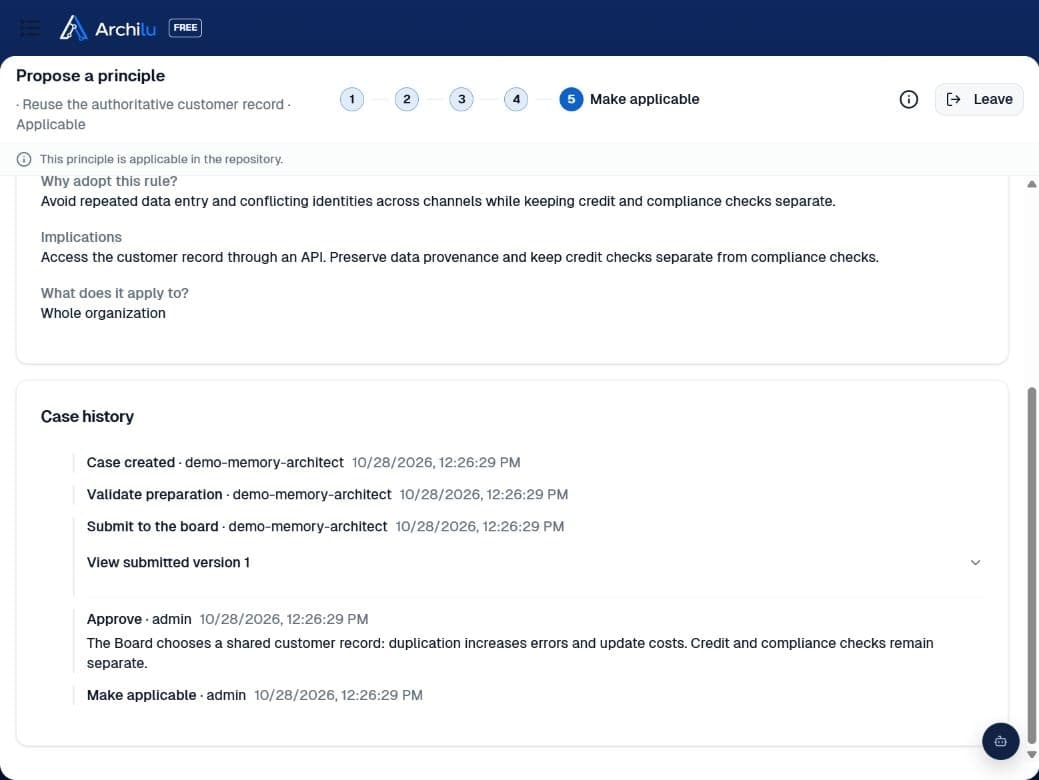
Record the choice: who decided, when, why and on which dossier version. The presentation and judgements reviewed remain available.
Document its architectural consequences: applicable principles, the approved target, affected elements and justified waivers.
Assess each new request against previous decisions: reuse what remains relevant and explain what needs to change.
Investigate before deciding: questions for responsible people, answers, then re-examination. Reasoned rework reopens the ADD and requires a new submission.
Keep decisions human: AI helps prepare judgements using this governed context. The authorised body decides; the architecture review then verifies what was actually delivered.
The Board chooses a shared customer record to avoid duplication. Its reasoning, the submitted version and the approval trail are preserved.
How does Demand management connect to enterprise architecture?
The request references affected capabilities, processes and applications. Qualification routes it to an Architecture Decision Record (ADR) or an Architecture Definition Document (ADD), according to your rules. Business and IT teams build the options and target together.
What does the decision journal preserve?
The choice, rationale, decision maker, date and dossier reviewed. For a submitted ADD, the version, presentation and judgements are preserved with the submission. A new submission retains the previous history.
How does a decision become an architecture reference?
Its consequences are documented in principles, targets and affected elements. A later request can be assessed against them: follow the principle, justify a waiver or propose a change. Teams retain the link to the reasons behind the choice.
What happens when the Board asks questions or requests rework?
Responsible people answer outstanding questions before approval, then the Board re-examines the dossier. Reasoned rework reopens the ADD: its owner prepares a new presentation and submits it again, preserving the previous submission.
Who decides, and what is AI's role?
The authorised body decides according to its mandate and rules. AI can help analyse options and prepare judgements using governed context. Humans validate the choices and preserve their rationale.
Does an approved target immediately become the current state?
Approval authorises the target. Teams implement the changes; the architecture review checks delivery. Only the part delivered and verified joins the AS IS, retaining its link to the decisions that authorised it.
Strategy & capability-based planning
Your strategy shapes the organisation. Your capabilities guide investment.
As teams and products evolve in parallel, every project brings its own solutions. Software introduces processes, rules, approvals and task lists. Its scope overlaps with other platforms, and teams end up doing the same work in different tools.
With ArchiLU, executive, business, IT and marketing leaders share their priorities. Enterprise architects connect them to value streams and the capabilities needed to deliver them. You gain a shared understanding of your organisation, its resources and its priorities.
Understand what your organisation needs to be able to do.
Value streams show how you deliver an outcome for customers and stakeholders. Capabilities describe what your organisation must be able to do to achieve it. Processes, activities, teams and applications explain how those capabilities are realised.
One shared capability. Three overlapping tools.
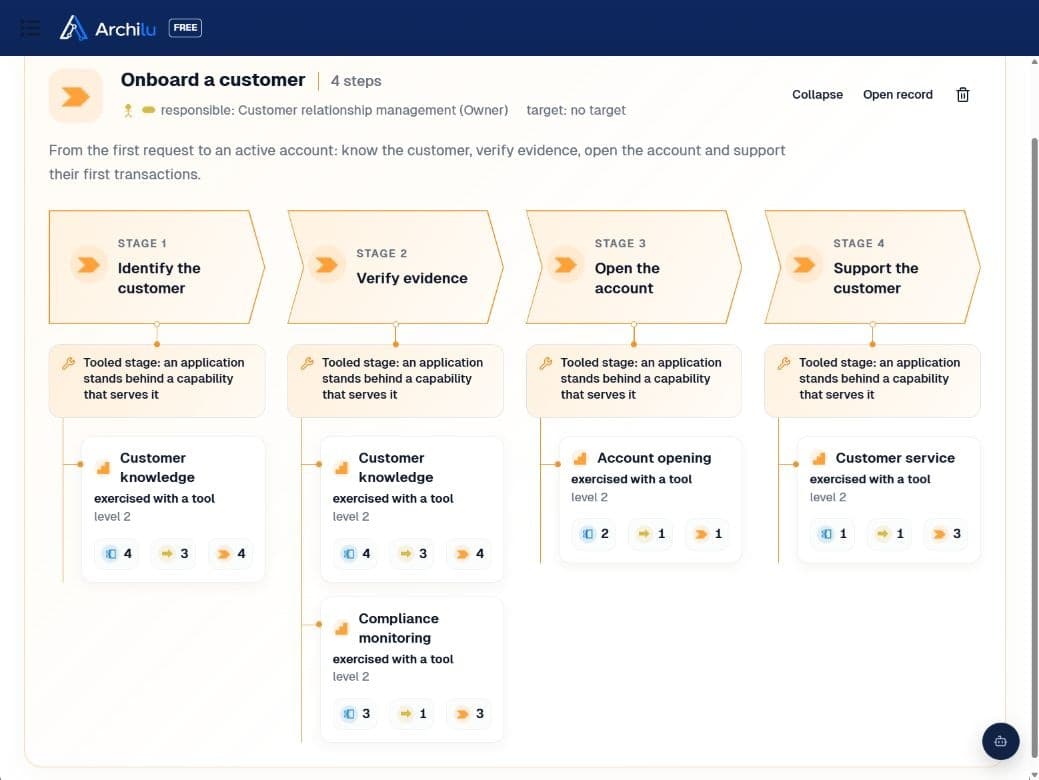
Branches, Lending and Compliance collect and verify the same customer evidence in three separate tools. In ArchiLU, customer knowledge connects four value streams, three processes and their applications. See what is repeated, who performs it and what it costs, to assess opportunities for sharing.
Onboard a customer, finance their project, execute a payment and maintain the relationship: four value streams use customer knowledge. Stages and their capabilities are connected in the graph.
01
Find the work you do more than once.
Compare applications with similar functions, parallel processes and activities repeated across departments. Identify what could be reused, consolidated or simplified, taking each team’s needs and constraints into account.
02
Clarify every demand.
Which capability do we want to improve or create? For which objective? Does it already exist elsewhere in the organisation? Projects and demands become part of a shared roadmap: this is capability-based planning.
03
Choose software for the role it must play.
Define the capabilities and processes a solution must support. Make overlapping platform functions and each system’s responsibilities visible, so the whole fits together.
04
Develop your operating model.
Find the teams delivering the same capability, overlapping responsibilities and activities with no clear owner. Inform decisions about shared services, specialisation and skills development.
05
Invest where your strategy needs it.
Identify capabilities to build, strengthen or reuse. Connect priorities to documented gaps, dependencies and expected outcomes.
06
Then understand the cost of your capabilities.
Once the graph is populated and costs are allocated through ABC/CBC, you can analyse the resources used by each capability and compare opportunities for improvement.
Industry references, adapted to your organisation.
Starting points to name, structure and check the coverage of your model. They do not define your strategy or replace your teams’ knowledge.
Depending on the framework, the starting point is capabilities, services or processes. These external resources support modelling; listing them here does not mean they are all integrated into ArchiLU.
Banking
BIAN Service Landscape
Banking service domains to structure and relate the bank’s functions.
Your teams move between tools, approvals travel by email and business rules are scattered through code. When nobody can see the process end to end, every transformation becomes an investigation. With ArchiLU, describe how your organisation works, from need to outcome, and connect that work to strategy and IT.
Business teams define their rules and responsibilities. IT designs how to implement them. A shared architecture helps both evolve the organisation together.
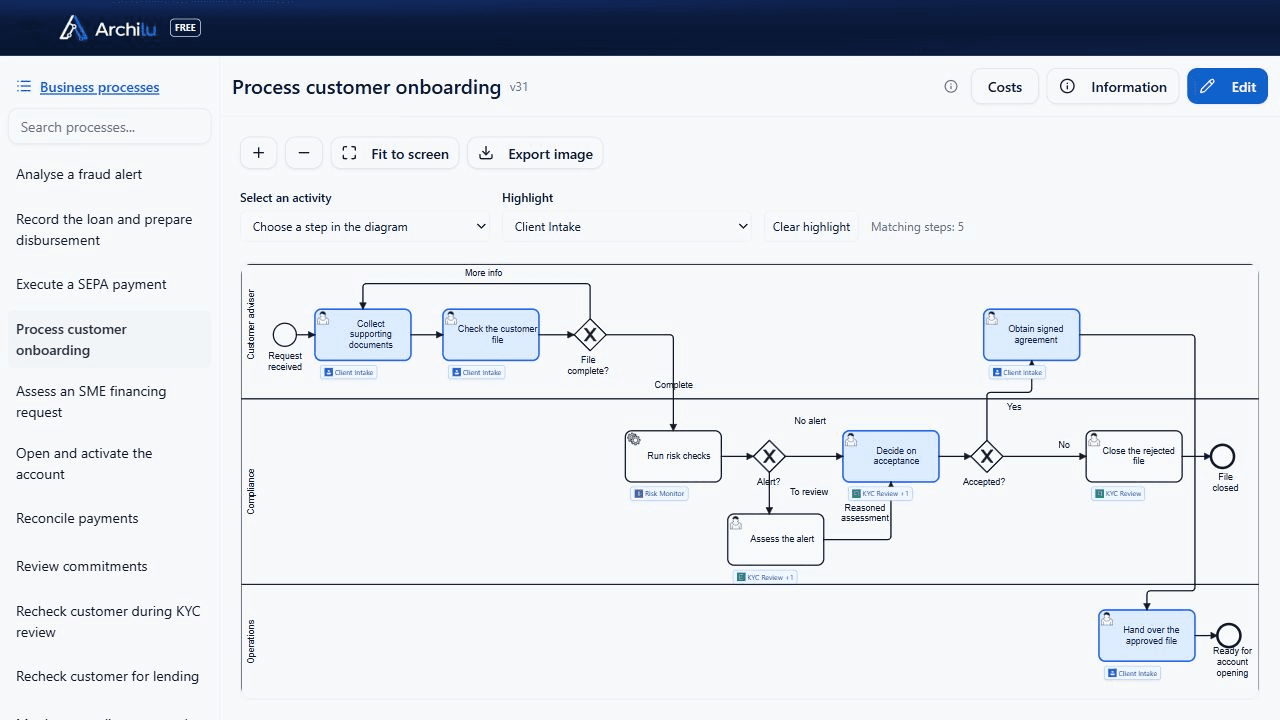
Your BPMN processes, connected to applications.
From collecting documents to customer acceptance, follow the work of advisers, compliance and operations. Applications appear on the activities they support, while automated checks and human decisions remain visible.
Who does what?
Lanes show the roles; activities describe the work, handovers and exceptions.
Using which application?
The logo on each task connects the process to its tool. An activity can use several applications and their services.
What needs to improve?
Open an activity to find its documentation, capabilities, roles and applications. Identify repeated data entry and examine dependencies before changing a tool.
From strategic direction to everyday work
Objectives and strategy
Value streams and capabilities
End-to-end processes
Activities and roles
Applications and data
Each process has a clear purpose. Each activity connects to the people performing it, the information it needs and the tools supporting it.
Understand the work as it happens.
Document triggers, expected outcomes, activities, roles, rules, controls and exceptions. BPMN makes team handovers, manual tasks and supported steps visible. From an activity, inspect its links to applications and capabilities.
Decide what needs to change.
Does this process still serve the strategy? Should you retain, improve, simplify or retire it? Connect your choices to capabilities, IT dependencies and documented costs. Change starts with a business objective and an explicit decision.
Automate the right activities.
Identify what AI can assist with, what a tool can perform and where human judgement is essential. Rules and controls remain understandable to their owners. Evolve execution while retaining control of how the business operates.
Your process in ArchiLU. Execution in your case manager.
Keep your choice of execution tool. A case manager integrated with ArchiLU can retrieve the BPMN definition through the API and use it to handle process instances: individual cases, their tasks and their progress.
ArchiLU · the model.
The process, activities, responsibilities and architecture context. Versioned BPMN definition available through the API.
BPMN · API · engine integration
Case manager · the instances.
After integration, your chosen tool manages individual cases, tasks and progress using the process adapted to its engine.
Qualify the integration with your chosen engine: supported BPMN elements, business rules to translate, forms, assignments and connectors. The documented model must be mapped to the rules needed for execution; a BPMN file alone does not guarantee immediate execution.
Processes are central to how your organisation works. The people changing the business must retain that knowledge.
Up-to-date repository
An up-to-date architecture repository, kept by the people accountable for it.
As an enterprise architect or CIO, you know who is accountable for every application, capability, process and technology. If your rules require it, the designated person accepts or declines the designation, and only an accepted responsibility counts. Every twelve months, each owner receives a task to confirm their objects.
Object chain: value stream, stage, capability, process, activity, role, application, interface, flow and technology, each with the person accountable for it.
The enterprise architect opens their dashboard on what no one is accountable for, and designates its owners in bulk.
If an approved target's horizon passes without confirmation that it was delivered, the owner of each object involved receives a task.
Plan: Enterprise Architecture. For the capability map, value streams and processes: Business Architecture.
When should we move from spreadsheets to an EA repository?
A spreadsheet stops being enough when you need to know who is accountable for each application and who changed it.
How do we bring an outdated architecture repository back up to date?
Start with what no one is accountable for. Each designated owner then completes or confirms their objects, and the dashboard shows, object type by object type, what remains to be completed.
We already run ServiceNow: do we still need an EA tool, and how does it sync with the CMDB?
Yes: the CMDB remains the source for operations, and ArchiLU links its applications to capabilities, processes and decisions.
What is the relationship between value streams and business capabilities?
Capabilities serve the stages of value streams. In ArchiLU, a capability shared by several value streams has its own study, and each value stream inherits the capability's target.
Which tool documents business processes, applications and systems end to end, collaboratively, in ArchiMate?
In ArchiLU, each process step carries the applications and services it uses, and an activity shared by two processes keeps a single identity.
How do I create an enterprise architecture roadmap?
Each landscape carries the current state, the target and a dated roadmap. The gap gives each element its work package and due date, and the 360 view shows the scope as of the chosen date.
DORA chain
The DORA chain, from critical functions to third-party providers.
When a critical function stops, which applications, ICT services and providers need attention? ArchiLU makes these dependencies visible using the graph maintained by your teams. Start with the function catalogue, open a dependency chain and find the contracts actually linked to its services. Missing links become visible before the next risk review.
Object chain: critical or important function → linked processes and capabilities → applications → documented ICT services, providers and contracts.
The function catalogue brings together criticality, ownership and supporting applications.
A dedicated view follows relationships to providers, distinguishing an application vendor from an ICT service provider.
Contracts covering the services appear in the chain. Missing links remain visible.
Business, IT, risk and compliance teams work with the same objects and can open their records from the view.
Plan: APM & Risk. With architecture dossiers and the board: Enterprise Architecture.
In ArchiLU: Payments → Payment Engine → Maelis Paiements. Four screens in the same application, connected through the same objects.
Identify what must keep running.
The function catalogue shows criticality, ownership and documented links. Critical or important functions are distinguished from supporting functions.
Understand why it is critical and what supports it.
The Payments record explains the impact of an interruption, names its owner and links to the Payment Engine application. Missing relationships remain visible.
Identify the provider: Maelis Paiements.
The actor registry opens the Maelis Paiements provider record, with its identity, status and role. The dependency chain links this same provider to the Payment Engine application and the ICT maintenance service.
See the dependency. Spot what is missing.
The dedicated view links Payments to its application, ICT services and documented providers. Contracts appear when they cover these services; missing links are identified for each object.
How do we maintain the DORA register of information year round?
The register is produced as a regulatory report. Each missing data item goes to its owner, who completes it, confirms it or accepts the gap with a reason.
How do we link contracts to critical functions under DORA?
The chain starts from the function and follows applications, then ICT services. It displays the contracts governing those services and identifies missing links. A contract in the register is not enough: its coverage must be documented.
How do I manage ICT risk through enterprise architecture, from critical or important functions down to applications and third-party providers?
The exposure analysis computes its findings: concentration, obsolescence, critical objects without an owner, open waivers. Each finding leads to a request, a risk or a board decision.
DORA exit strategy: what should the plan contain, and how do we assess provider substitutability?
The provider carries its substitutability and its exit plan. Each capability shows its dominant provider and that provider's share.
How do we maintain an audit trail of architecture decisions and approvals?
The audit trail is chained, verifiable and exportable by the administrator. Segregation of duties is on by default, and its removal is logged.
How do we set up proportionate IT architecture in a small Luxembourg financial firm?
An architect can set up a foundation alone in free mode. A decision body can have a single member, and one person can hold several profiles.
Pentest
Less time mapping. More time testing.
Your enterprise graph is populated and governed. Your penetration testing provider has a starting point: applications, technologies, flows, dependencies and owners. Preparation becomes more precise. Testing focuses on what matters to your business.
Target the right assets.
Define scope from business processes and the systems that support them. Documented dependencies and flows help testers formulate potential attack paths to verify against the real environment.
Prioritize by business impact.
The same technical vulnerability can have very different consequences depending on the data, services and functions affected. Connect findings to your financial, operational and regulatory priorities.
Prepare through MCP and the API.
Your testing provider can connect tools and assistants to ArchiLU’s context within the permissions granted. Collecting scope, mapping dependencies and preparing investigations can be automated; the provider defines and conducts the tests.
Let each pentest improve your architecture.
Before: documented scope. During: context to understand discoveries. After: affected assets and their owners to guide remediation.
Use discrepancies found during testing to correct the map, raise the necessary requests and track their treatment through governance. The next pentest starts from richer knowledge checked against reality.
Application portfolio
Manage your applications' lifecycles and dependencies.
As a CIO or portfolio manager, you keep the list of your applications, each with its owner, criticality, lifecycle and vendor. Each application is linked to its capabilities, processes, interfaces, technologies and contracts: before touching it, you see what depends on it. The application's owner proposes its TIME class (tolerate, invest, migrate or eliminate) with a reason, and the enterprise architect holds it. Retirement runs through to the realized savings.
Object chain: capability, applications that support it, interfaces and data, processes, technology and end of support, contract and cost, user feedback, TIME class, retirement or merge, realised savings.
The application list can be filtered by type, criticality, vendor or actor, and keeps your named views.
An application's record shows it layer by layer, from business to technology, with its data and its history.
On the capability map, each capability shows its applications, directly or through a process, and redundancy stands out when several applications support it.
Links between applications and capabilities are set on the map or imported from Excel.
Each interface, inbound or outbound, states its protocol and the data it carries.
Each application shows its technology stack; 90 days before an end of support, a case opens: extend, migrate, retire or accept the risk.
A contract is allocated to the applications it covers, with the rationale for the split. You track licence costs and renewals application by application.
Each user gives private feedback on the applications they use; this feedback is read only in aggregate, over twelve months and from five respondents.
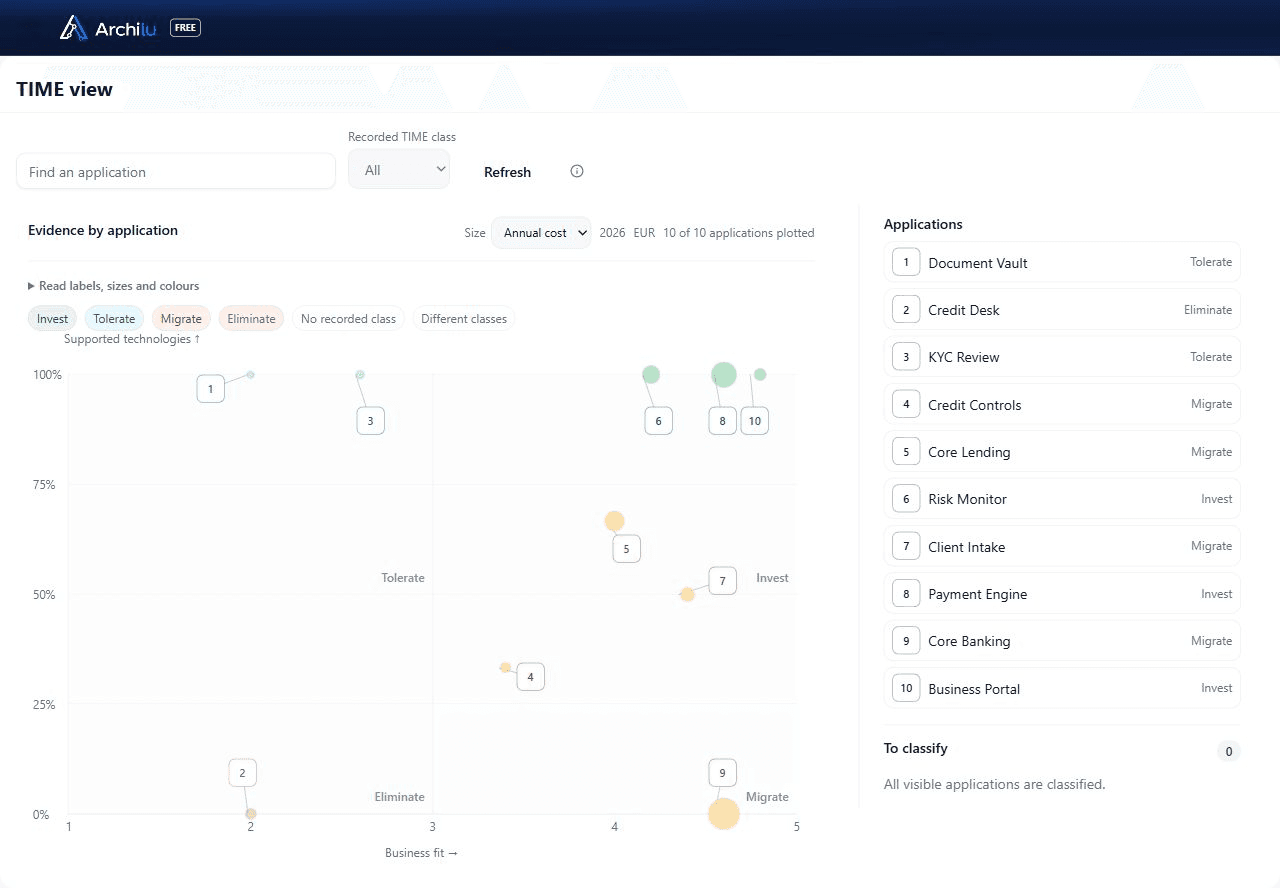
The TIME view places each application by its users' feedback and the support of its technologies, in the colour of its recorded class.
“Withdraw” opens a four-step case: impact, replacement, decision and execution. “Merge” moves a duplicate's links onto the application that remains.
The portfolio review gives the cost of the retirement candidates, the estimated savings and the realized savings, each with its period and currency. An unknown never counts as zero.
User feedback and technology support position each application. Bubble area represents annual cost; colour shows the recorded TIME class. Modernise Client Intake, retire Credit Desk after transferring its functions, and develop Payment Engine.
Technology roadmap
Anticipate obsolescence. Plan your migrations.
The end of technical support becomes a business issue when it affects an application your teams rely on. ArchiLU connects deadlines, linked applications and replacement technologies to inform your priorities and roadmaps.
Which deadlines are approaching?
Distinguish end of support from end of life. Identify overdue deadlines, those within the next twelve months and dates that still need documenting.
Which applications are involved?
Find linked applications and their criticality. Return to their architecture context to examine the processes and dependencies to consider.
Which replacement should you prepare?
Document the replacement technology, coordinate related migrations and prepare a change request. The architecture dossier and a human decision approve the trajectory to pursue.
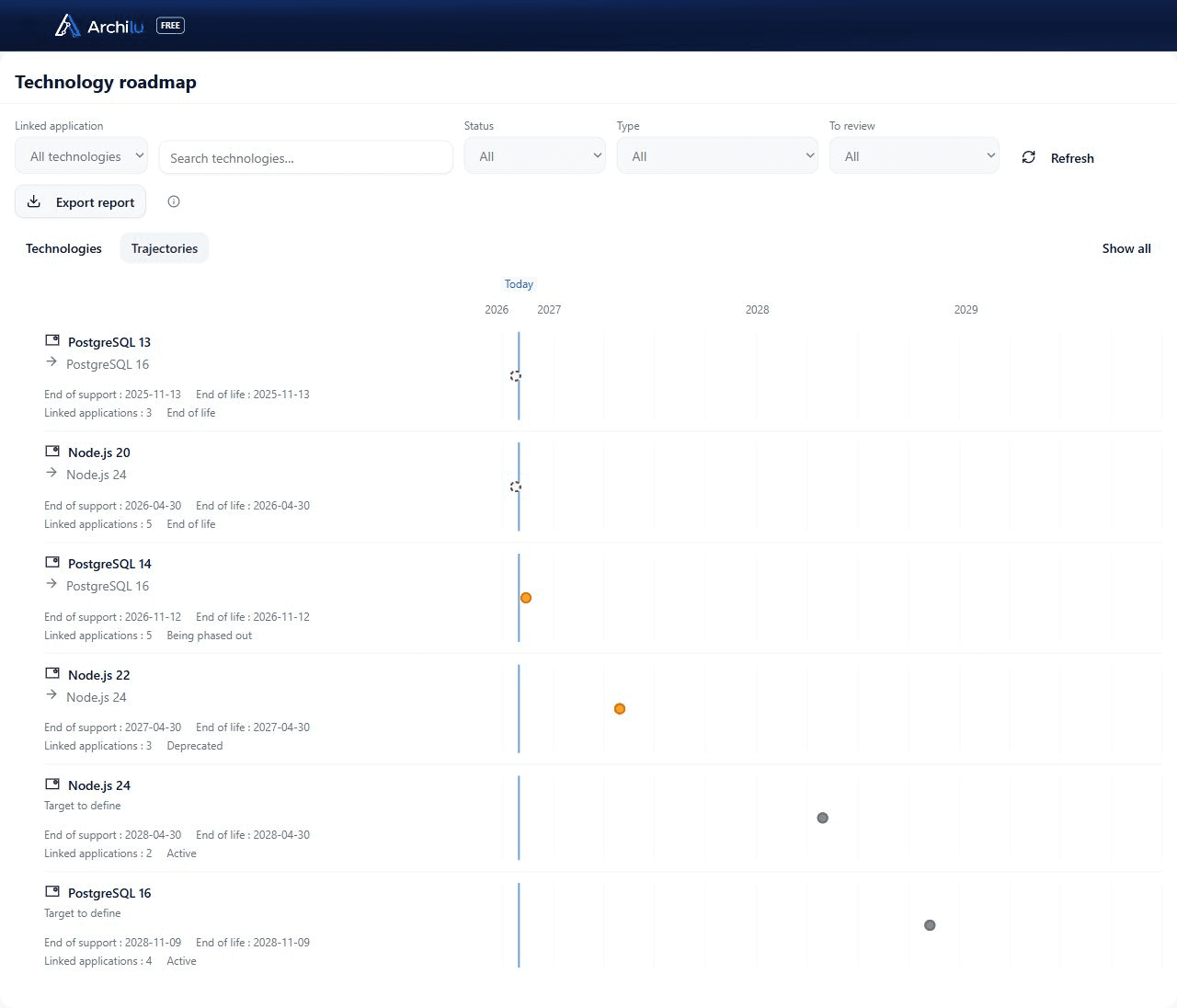
Node.js 20 is linked to five applications, including Client Intake and Core Lending. The trajectory towards Node.js 24 helps prepare a shared migration, identify the teams involved and organise testing before agreeing the schedule.
Application portfolio management: tools, framework, where to start?
Start with the inventory: each application with the person accountable for it, its contracts and its technologies. The CIO dashboard then brings together contract commitments, business dependencies, technology due dates and the portfolio review.
The TIME method sorts each application into tolerate, invest, migrate or eliminate. In ArchiLU, the TIME view provides the evidence, and the class remains a decision recorded with its reason. After “Eliminate” or “Migrate”, the owner chooses to prepare the retirement or to open a request.
How do we identify the impact of changing or retiring an application?
The 360 view centred on the application shows its flows, its interfaces, the processes it serves and the capabilities it realizes. The portfolio review gives, for each application, its contracts and what depends on it.
How do we find applications running on technologies without vendor support?
A technology attaches to the component that uses it, and the application inherits the technologies of its components. The CIO dashboard lists support end dates, known or unknown, and the TIME view shows them application by application.
How do we track licence renewals and the applications concerned?
The Contracts page gives the provider, the annual cost, the due date and the automatic renewal flagged. Each contract appears in the 360 view of the applications it covers.
How do we rationalize application portfolios after a merger?
The dashboard shows the capabilities supported by several applications. Each duplicate then goes through its TIME class and on to retirement or “Merge”, and each estate's savings read in its own currency.
AI
Your AI reasons. You keep the decision.
Your graph is documented by business teams, kept current by its owners and linked to decisions. It becomes your AI's governed context: what exists, what is proposed, what was approved and why. Use ArchiLU's integrated AI or connect your enterprise assistant through MCP. Models can change; knowledge and authority stay with your organisation.
Governed workflow: current context → AI analysis and proposed options → people review views and the dossier → the authorised body decides → authorised, traceable execution.
Support for each role: describe an activity, complete a record, analyse dependencies, prepare an ADD or compare options.
Processes, rules and responsibilities remain explicit in the architecture. Choose which activities AI should improve, without burying how your organisation works in opaque code.
Teams examine proposals in 360 views, landscapes and dossiers. They can check impacts, raise questions and decide.
Permissions govern reading and actions. Proposals, approvals and changes remain traceable: the technical ability to act is not a mandate to decide.
The context available to the person using it: objects, relationships, dossiers and decisions within the authorised scope. Administrators can prohibit AI use for a person or role. Choose the model provider and hosting according to your data policy.
What can it do?
Read, analyse, propose and, where permissions and governance mode allow, apply writes. Changes requiring approval follow that workflow; authors cannot approve their own changes. AI provenance remains recorded.
How far can it decide?
AI prepares options and explains their consequences. Accountable owners and members of the competent governance body decide within their mandate. Write access to the graph replaces neither a business decision nor the architecture review before a target becomes AS IS.
How does AI support teams without replacing them?
It helps business teams describe activities, IT owners document assets, architects prepare the ADD and committees compare options. Each person reviews the result through their own views and terminology, and remains accountable for their decisions.
Why model processes before automating them?
To understand which activity changes, which rule applies, who is accountable and which control stays human. ArchiLU links that operating model to the applications and data that support it. Execution can evolve while business understanding is preserved.
Can we keep our own enterprise AI?
Yes, through an assistant compatible with ArchiLU's MCP server, or an API integration. MCP connects an assistant to context and tools; a model alone is not enough. The integrated AI provides another way into the same governed architecture.
Which model should reason over your architecture?
For complex dossiers, start by comparing Claude Opus 5.5 and GPT-6 Astra. Add Gemini 4 Argon for multimodal material, or Mistral Small 4 if deployment control matters. Evaluate these candidates on your own dossiers, languages and data constraints.
Claude Opus 5.5.
A starting point for preparing dossiers and comparing options with a tool-using assistant.
Compare the same options against the same graph. Check sources, dependencies, AS IS versus target, missing information and permission enforcement. Then measure review time, cost and latency. This documentary shortlist is not based on an EA benchmark run by ArchiLU.
Connection depends on the MCP client, authentication and exposed tools, or the API adapter. A model recommendation does not guarantee immediate compatibility with the integrated assistant. Also check where context is processed and retained.
Integration with your tools
ArchiLU plugs into the tools you already have.
Your tools, tickets and infrastructure already hold knowledge about your enterprise. ArchiLU brings it together to inform the graph and architecture dossiers. Each observation retains its source; owners validate what enters the repository.
Discovery: machines and connections.
Within the authorised scope, the collector observes Linux machines, Docker containers, identifiable software and versions, and their TCP connections. These facts become proposals for review.
Why it matters: build your architecture map from what actually runs and identify gaps with the repository.
ServiceNow: from CMDB to EA.
Reuse applications, owners and lifecycle data, alongside supported servers, deployed software, services and relationships from the CMDB. The connection reads ServiceNow without changing it.
Why it matters: use your existing technical inventory to analyse architectural dependencies.
Jira: requirements in context.
Selected tickets, descriptions and comments become sources for the architecture dossier, retaining their original link and date. The connector supports Jira Cloud and Data Center.
Why it matters: assess a demand using the requirements and discussions your teams have already documented.
Confluence: pages as sources.
Attach relevant pages to an architecture dossier, preserving their content, author, version and original link. The connector supports Confluence Cloud and Data Center.
Why it matters: prepare decisions from traceable documents without collecting the same information again.
Microsoft Entra ID.
Discover applications registered in your directory, their publishers and owners. Where permissions and licensing allow, an aggregate sign-in count adds usage context to the proposal.
Why it matters: enrich your application portfolio and identify the owners who can validate it.
GitHub: components and dependencies.
Repositories, languages and runtime dependencies inform proposals for application components and technologies. You then link them to the relevant applications. GitHub Enterprise Server is also supported.
Why it matters: connect what your teams develop with what your architecture describes.
MCP: context for your AI.
Your enterprise assistant consults a living graph: processes, assets, dependencies, owners and decisions. Its access and actions remain governed by ArchiLU's permissions and governance.
Why it matters: change models without rebuilding enterprise knowledge or losing the decision history.
API.
Your tools and agents read the graph and submit changes through ArchiLU's governed write workflow.
Why it matters: automate exchanges within the authorised scope, retaining provenance and change history.
Excel workbook.
Your spreadsheets come in through a workbook, with one sheet per object type and the links between them.
Why it matters: your spreadsheet inventories become the starting point of the repository.
Exports.
The repository exports to Excel, dossiers to Word and PDF, landscapes to the architecture tools exchange format, 360 views to PlantUML.
Why it matters: your landscapes open in other architecture tools.
References.
You start from a reference catalogue or from the dataset of a fictitious company in your sector. A sector model, BIAN for banking, loads through the workbook.
Why it matters: you adapt a model instead of entering everything, and a licensed reference is flagged.
Management accounting
ABC/CBC management accounting, built on the complete enterprise graph.
Once the enterprise graph is established and governed, management accounting connects processes, their activities, roles, the resources used and business capabilities. ABC provides a view of costs by activity and process; CBC organises the view by capability. Finance and business managers work from documented relationships, cost data and allocations across the enterprise. Applications and their contracts contribute alongside other resources.
Object chain: documented enterprise graph, processes and activities, roles and resources used, cost data and allocations, cost by activity (ABC) and by capability (CBC).
A process record gives its annual cost, broken down by activity and by role.
The process owner enters the duration and frequency of each activity; the administrator enters each role's hourly rate.
As long as a role has no rate, the cost stays “cannot be calculated” and that role is named.
Your rules set which roles read hourly rates; other readers see aggregated costs.
The capability view brings together documented cost allocations, with their source and allocation method.
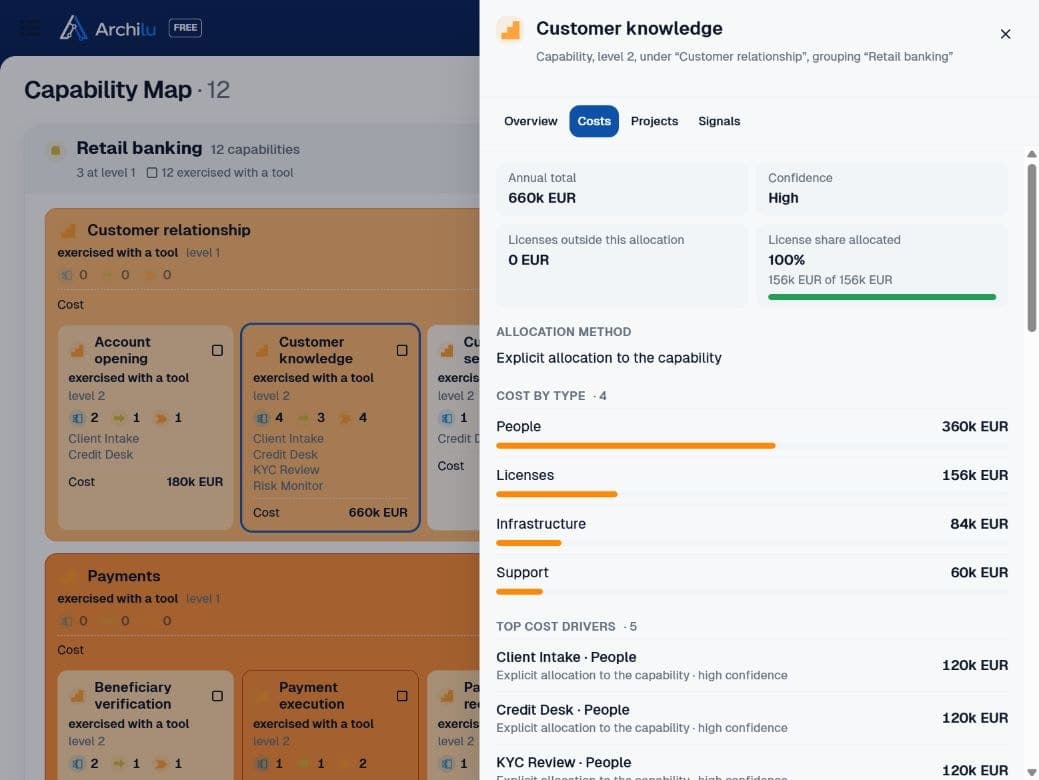
The heatmap places customer knowledge within the capability map. Its detail combines costs allocated across three processes: onboarding, lending and KYC review.
€660,000
per year for customer knowledge
€360,000 in business effort, €156,000 in licences, €84,000 in infrastructure and €60,000 in support. Allocations document the method: assigned contract, consumption share or share of tickets.
How do I calculate the cost of a business process?
An activity's annual cost is its duration, multiplied by its frequency, by the hourly rate of its role and by that role's share. The process adds up its activities.
Activity-based costing: Excel template or software?
In ArchiLU, an activity's panel shows its cost line, its roles and the other processes that use it.
How do activity costs inform capability costs?
The capability view draws on the activities linked to it and on documented cost allocations. The source and allocation method explain the amounts shown. This view becomes meaningful when processes, roles and resources are connected in the enterprise graph.
Sectors.
Banking and regulated finance.
Your DORA obligations sit in one chain, from the critical or important function to the ICT third-party provider's contract. The auditor reviews each board decision, with its reason.
Insurance.
Insurance undertakings also fall under DORA: the same chain links their critical or important functions to their ICT third-party providers and their contracts.
Public sector.
A public administration describes its value streams and capabilities in the words of its teams. Its architecture decisions go before an architecture board of its own composition, under versioned rules.
Industry and services.
A production process is drawn with its activities, roles and applications, and its annual cost reads from its activities.
ArchiLU's position.
The repository and the decisions.
In ArchiLU, owners confirm changes to the objects they are responsible for. The architecture board makes its decisions using the same graph.
The AI has its user's role.
In ArchiLU’s graph, AI consults what its user is authorised to see: actors and responsibilities, value streams, processes and activities, open requests, decisions taken and frozen versions of dossiers. Administrators can disable AI use; its actions remain subject to the governance mode.
The operating model is set up in the tool.
The administrator sets the governance mode and the acceptance of designations. They also define who can open a foundation and who sits on the board. Each setting keeps its history: who changed it, when and what.
Frequently asked questions.
What is enterprise architecture, and where do I begin?
Enterprise architecture describes what the organisation does, with which applications and technologies, and how it changes. You can start with a request, a solution or a process. The EA framework defines the scope, principles and decision bodies.
Where can I practise enterprise architecture on a complete example?
A fictitious mid-sized bank installs in an instance, with its repository, rationalization, board, audit and recruitment. The dataset reloads and runs as a dry run, and twenty guided tours accompany the steps.
What is the difference between TOGAF, ArchiMate, Zachman and BPMN?
TOGAF is a method, ArchiMate an architecture notation, BPMN a process notation and Zachman a classification grid. In ArchiLU, landscapes are displayed in ArchiMate and processes are drawn in BPMN; the architecture dossier follows the TOGAF approach.
ArchiMate vs BPMN: when should I use each?
ArchiMate links capabilities, processes, applications and technologies; BPMN describes how a process runs, step by step. In ArchiLU, the business landscape stops at the process, and the BPMN drawing carries the applications used on each step.
ArchiMate 4 vs 3.2: what changed?
ArchiMate 4 reduces the number of elements and groups the behaviour of all domains into a single set: service, process, function, event. It speaks of domains where version 3.2 spoke of layers. ArchiLU organizes its model by ArchiMate 4 domain.
How do I choose an enterprise architecture tool?
Judge the tool on your own case, during the one-month trial on your instance: see who answers for each object and how decisions are made.
Are there free or open-source enterprise architecture tools?
Open-source modelling tools are available. In ArchiLU, the whole organisation works in one graph, each person with their role. The subscription is annual, and you can try it free for one month.
What is ArchiLU and who makes it?
ArchiLU is enterprise architecture software published by MIP-IT SARL, in Heinerscheid, Luxembourg. Each object can have an owner; objects without an owner remain visible. AI access and actions depend on the user’s permissions and the governance mode.
What does ArchiLU do for DORA?
Each function carries its criticality under DORA and links to its processes, applications, ICT third-party providers and their contracts. This chain documents dependencies useful for preparing the register of information.
Where is ArchiLU hosted, and can it be deployed on-premises?
Each organization has its dedicated instance, hosted in the European Union. ArchiLU can also be deployed on your premises, whatever the plan.
What security guarantees should we ask of a SaaS enterprise architecture tool?
In ArchiLU, sign-in can go through your company directory. The administrator requires two-step verification for everyone or for a role, or leaves it to each user's choice. Before requiring it, the administrator sees the accounts that could no longer sign in.
At the end of a SaaS contract, how do we get our data back, and in which formats?
The full export takes the whole repository and re-imports into an empty database. Data also exports in several formats: Excel, Word, PDF, the architecture tools exchange format and PlantUML.
Is ArchiLU available in German, with hosting in the European Union?
Yes, for both language and hosting. Screens, tasks and the help for each object type exist in German, as in French and English.
Plans.
Business Architecture.
Price
from€14,900per year
What it includes
For the business architect and the transformation teams, who together set out the strategy, capabilities, value streams and processes of the enterprise.
The multi-year strategy and its goals, the organization's drivers and the goals that answer them.
The capability map, with the exercise state declared by each owner.
Value streams, each stage with the capabilities that serve it.
Actors, roles and processes in BPMN, with one lane per role.
Activities, shared between several processes under a single identity.
The foundation set up from your repository, a reference catalogue or a dataset.
Collaborative documentation through each role's cases, approved by the enterprise architect.
A dashboard per role and the 360 view of each object.
Excel import, the API and the MCP server for your AI assistants.
Exports in several formats.
The audit trail: each version with its author, and the AI's trace.
Unlimited users, readers included.
APM & Risk.
Price
from€14,900per year
What it includes
For the CIO, the portfolio manager and the risk and compliance functions, who keep the applications, their costs, their contracts and the DORA chain.
The list of all your applications, with owner, criticality, lifecycle and vendor.
The record of each application, layer by layer, with its history.
Applications linked to capabilities, and redundancy when several support the same one.
Interfaces, their protocols and their data, and the 360 view of dependencies.
Technology end of support: extend, migrate, retire or accept the risk.
Contracts and licences, with due date, renewal flagged and allocation to applications.
The licence cost of each capability, calculated from its applications.
The TIME view and private user feedback; the class is proposed by the owner and held by the architect.
Four-step retirement, merging of duplicates and the review of estimated and realized savings.
The DORA chain, from the critical or important function down to the subcontractor and the contract.
The exposure analysis, the DORA register of information and an auditor account limited to its engagement.
The CIO dashboard: contract commitments and support end dates.
The Business Architecture core: Excel import, API, MCP, exports, audit trail, unlimited users.
Enterprise Architecture.
Price
from€24,900per year
What it includes
For the enterprise architect, the CIO and executive management, who govern the architecture of the whole enterprise, from the request to the board's decision.
Everything in Business Architecture and in APM & Risk, plus:
Landscapes of the current state, the target and the dated roadmap.
The gap element by element, with its work package and due date.
Designated owners, who accept or decline with a reason if your rules require it.
The list of what no one is accountable for, and bulk designation of owners.
The ServiceNow connector, which reads the CMDB without writing to it.
Requests, qualified under your rules as a decision record (ADR) or a dossier (ADD).
The architecture dossier following TOGAF: business and IT targets, questions, principles, waivers.
The architecture board: item-by-item voting, escalation, decision log.
The architecture review, which confirms the delivered target before it enters the repository.
The review prepared for the executive committee.
AI that advises, analyses a request and helps produce the dossier; a human approves.
AI barred by the administrator for a person or a role.
Enterprise Cost Management.
Price
from€29,900per year
What it includes
What do your activities, processes and capabilities cost? Where should you consolidate, improve or invest?
Ground your management accounting in your enterprise graph, with costs analysed by activity (ABC) and capability (CBC).
Everything in Enterprise Architecture, plus:
The annual cost of each process, by activity and by role.
Activity durations and frequencies, role hourly rates and shares.
A role without a rate is named, and the cost reads “cannot be calculated” while the rate is missing.
Costs rolled up to processes, then to the capabilities they serve.
IT costs by application and by capability, each dated and sourced.
Prices are annual, per organization, excluding VAT.
Deployment on your premises is a service on quotation; it does not change the plan price.
One month of trial on your own instance.
Tell us about your organisation and what you want to improve: we prepare your free trial with a plan and dataset suited to your objectives. Your dedicated instance is in service within two working days, with the ArchiLU Reference. At the end of the month, it becomes your subscription, or it is deleted with its data.